blk
introduction
broken link: https://github.com/mahmoodsh36/blk tries to generalize the idea of creating and navigating titles of text files, as well as making links from one file to another, or one block to another (possibly in different files). if you have used org-roam, denote, or other similar tools like obsidian and logseq, you would know that inserting links between two files (or nodes, as they're usually called) and navigating them is a must-have feature for note-taking, with blk, instead of restricting links to specific elements of text, such as a file or a heading, we can insert links to arbitrary forms of text, be it links to an org heading (or markdown heading), or a code block in an org file, or even links to python functions, elisp functions, or an html element (by its id).
motivation
most note-taking packages introduce rules or syntaxes of their own, for example, org-roam inserts something akin to the following text to identify headers and files (which, by the way, blk knows how to handle):
  :PROPERTIES:
  :ID: <some-random-id-here>
  :END:
org-roam does for headers and files? what if i wanted to identify a list item? say i wanted to write down the axioms of a vector space and i do it in the following manner in my org-mode file: ,#+begin_definition
a /vector space/ is a set that satisfies the following axioms:
- closure of addition,
- closure of multiplication
- closure of..
- etc..
,#+end_definition
consider the second axiom of vector spaces, we..
org-roam user would most likely insert a link to the header or the file containing the definition, but this isnt precise enough. first, it doesnt send the user to the axiom itself. second, the file may contain other text which would make finding the axiom the text refers to even less trivial.to accommodate this,
blk suggests the following syntax: ,#+begin_definition
a vector space is a set that satisfies the following axioms:
- closure of addition,
- <<<vecspace-axiom-2>>>closure of multiplication
- closure of..
- etc..
,#+end_definition
[[named-target-here]], so for the target above, we would write: consider the [[vecspace-axiom-2][second axiom]] of vector spaces, we..
blk suggests is simply the following: consider the [[blk:vecspace-axiom-2][second axiom]] of vector spaces, we..
again, so far so good, but the text vecspace-axiom-2 acts as an "id" and may be hard to remember each time you want to pull up the definition of a vector space. so again, to accommodate this, blk suggest to rewrite the definition block as the following:
  ,#+name: vecspace
  ,#+begin_definition :title vector space
  a vector space is a set that satisfies the following axioms:
  - closure of addition,
  - <<<vecspace-axiom-2>>>closure of multiplication
  - closure of..
  - etc..
  ,#+end_definition
#+name property can be written on the same line as the title property: ,#+begin_definition :title vector space :name vecspace
a vector space is a set that satisfies the following axioms:
- closure of addition,
- <<<vecspace-axiom-2>>>closure of multiplication
- closure of..
- etc..
,#+end_definition
blk-find can be invoked, and the user can navigate to the definition by its title "vector space", and if the user wants, they can even rewrite the cross-reference of the text we considered before to link to the definition too, in the following manner: consider the [[blk:vecspace-axiom-2][second axiom]] of [[blk:vecspace][vector space]]s, we..
blk-treat-titles-as-ids (set to t), they can write the following: consider the [[blk:vecspace-axiom-2][second axiom]] of [[blk:vector space]]s, we..
:title and :name are supported for any type of block, not only #+begin_definition blocks, so we can use them for a #+begin_theorem, for example.)again, so far so good. but what if we want to write some code that makes heavy use of mathematics, and for some reason we wanted to refer to the definition of a vector space in our code, how would we do this? simple enough:
  (defun my-function ()
    "this function does the following etc... refer to the definition of a [[blk:vector space]]"
    (message "magic!"))
blk-open-at-point is invoked at the link, emacs takes us to the definition of a vector space.notice that for this to work, blk has to find the mentioned files in the directories listed in the variable
blk-directories (it would search recursively if blk-search-recursively is set to t).we can take things even further and use transclusions. say we want to not just link to the definition, but to insert it into the current document, without having to copy it from the other file and paste it into the current document, which would mean that modifiying one of them would cause the other to be "outdated", this is done using
blk's integration with org-transclusion: consider the following definition of a vector space:
#+transclude: [[blk:vecspace]]
M-x org-transclusion-mode.this workflow is demonstrated in the following gif:
main features
- linking to any type of text, without having to worry about filenames or the location of the text itself.
- navigating text elements by their titles, including support for outline navigation, e.g. the outline for an org src block:
file/heading/block. - support for alises to any title, so that any text element can be navigated to by its "main" title or one of its aliases (this includes org files, for an example).
org-mode specific features
- links to org-mode special blocks.
- links to an arbitrary point in any org-mode file defined by
<<<id-here>>>(cross-file target links). - transclusion of latex environments from an
orgortexfile into another org file, by its\label.
basic setup
  (use-package blk
    :straight (blk :host github :repo "mahmoodsh36/blk") ;; replace with :quelpa if needed
    :after (org)
    :config
    (setq blk-directories
          (list (expand-file-name "~/notes")
                user-emacs-directory))
    (add-hook 'org-mode-hook #'blk-enable-completion)
    (setq blk-use-cache t) ;; makes completion faster
    (global-set-key (kbd "C-c o") #'blk-open-at-point)
    (global-set-key (kbd "C-c f") #'blk-find)
    (global-set-key (kbd "C-c i") #'blk-insert))
  (use-package org-transclusion
    :config
    (add-hook 'org-mode-hook #'org-transclusion-mode))
  (use-package blk
    :straight (blk :host github :repo "mahmoodsh36/blk") ;; replace with :quelpa if needed
    :after (org org-transclusion)
    :config
    (setq blk-directories
          (list (expand-file-name "~/notes")
                user-emacs-directory))
    (add-hook 'org-mode-hook #'blk-enable-completion)
    (blk-configure-org-transclusion)
    (setq blk-use-cache t) ;; makes completion faster
    (global-set-key (kbd "C-c o") #'blk-open-at-point)
    (global-set-key (kbd "C-c f") #'blk-find)
    (global-set-key (kbd "C-c i") #'blk-insert))
demonstration of features
org-mode files
by default, blk has rules in place to recognize org-mode files that are titled and id'd in the following manner (the usual way):
  :PROPERTIES:
  :ID:       0e7165f6-27e8-4e56-a342-b00572b7fff2
  :END:
  ,#+title: my-title-here
org-id-get-create.or, as an alternative (as inspired by the package
denote): ,#+title: my-title-here
,#+identifier: my-id-here
[[blk:my-id-here]] or [[blk:my-id-here][link description here]].in addition, the title of an org-file can have an alias:
  ,#+title: my-title-here
  ,#+identifier: my-id-here
,#+alias: my-second-title-here
,#+alias: my-third-title-here
org-mode blocks
blk has rules in place to recognize org-mode special-blocks (or src-blocks) that are written in the following way:
  ,#+begin_blockname :name my-block :title my title
  this is my block
  ,#+end_blockname
blockname in begin_blockname and end_blockname is replaced by any other value.or, as an alternative (this aligns with how org-babel identifies src blocks):
  #+name: my-block
  ,#+begin_blockname :title my title
  this is my block
  ,#+end_blockname
[[blk:my-block]] or [[blk:my-block][link description here]].in addition, the title of an org-block can have an alias:
  ,#+begin_blockname :name my-block :title my title :alias my second title
  this is my block
  ,#+end_blockname
org-mode headers
again, this is just the usual way, the id is created by org-id-get-create and the title is inserted manually:
  ,* my header title
  :PROPERTIES:
  :ID:       0e7165f6-27e8-4e56-a342-b00572b7fff2
  :END:
org-mode named targets
a named target is a link to a specific location in text, the location is identified in the following way:
this is my very long sentence that has a <<<target>>> in it.
[[blk:target]].markdown headers
a markdown header isnt identified (by default) but can be navigated to by its title, the reason for this is that i didnt find a common way to identify markdown headers.
# my markdown header
blk-treat-titles-as-ids is t): [[blk:my markdown header][my description here]]. linking to an elisp function
  (defun my-function ()
    )
[[blk:my-function][link description here]].latex labels
a block of latex can be identified by its \label (both in .org and .tex files):
  \begin{equation}\label{my-equation}
    f(x) := \sqrt{x} + 1
  \end{equation}
  ,#+name: my-equation
  \begin{equation}
    f(x) := \sqrt{x} + 1
  \end{equation}
[[blk:my-equation][my description]].outline navigation
(poorly-phrased,) the grouping feature allows to group certain rules together to form "outlines", which are titles of nodes that are in the same file, that form an "outline" or a "path" to the target.
consider an org-mode file with the following contents:
  :PROPERTIES:
  :ID:       35265ce3-3226-46f6-b690-2f5630a3b9f0
  :END:
  ,#+title: my test org mode file
  ,* this is my first header
  this is some random text
  ,* this is my second header
  this is some random text
  ,#+begin_src python :name my-python-block
    import os
    os.system('ls')
  ,#+end_src
blk-find, this is what we are presented with: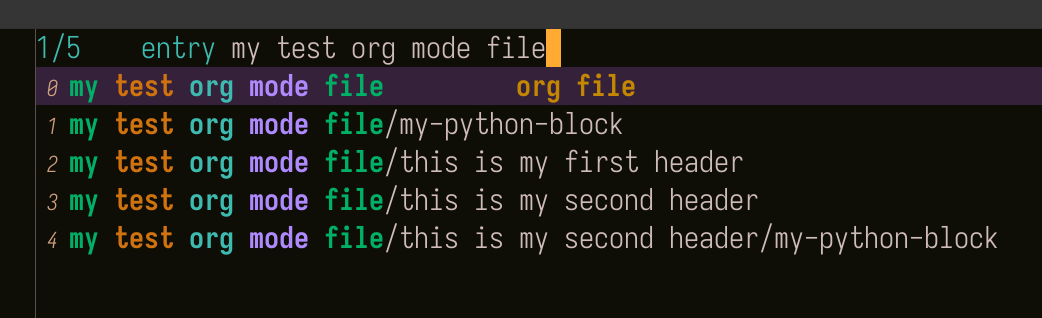
latex transclusions
writing custom rules
when im taking notes in math, what i like to do is write the following:
  #+begin_definition :name def-comp-fun :defines computable function :alias partially computable function
  a /computable function/ is any function that is a member of the class of mu-recursive functions.
  #+end_definition
:defines tells me what this block defines, :alias tells me that the following value is an alternative name to what :defines has, and :name is supposed to give the block a unique string it is identified by.now, with the rules pre-defined in
blk.el, it would be possible to use the keyword :title and have blk recognize it, but not :defines. to have blk recognize this new keyword, we add the following rule, which is a modified version of the rule blk-rg-org-file-rule from blk.el: (add-to-list
'blk-patterns
(list :title "definition"
:glob "*.org"
:anchor-regex "(:defines)\\s+[^:]+"
:title-function 'blk-value-after-space-upto-colon
:extract-id-function 'blk-org-id-at-point))
blk-grepper is set to blk-grepper-rg or blk-grepper-grep (this is true by default, depending on whether you have rg installed, see the different greppers section).the value provided to
:anchor-regex may look scary to someone who isnt very familiar with unix regex, but its really just a regex passed to the grepper to identify the keywords we're aiming for.the roles of the keywords in the list above are described in the docstring of
blk-patterns: The list of patterns to use with the blk grepper.
Each entry should be a plist representing the data of a pattern:
:title is the title/type of the pattern (used for completing-read).
:glob is the glob pattern to matches files to be grepped.
:anchor-regex is the regex for matching blocks of text that contain
the target value which is then passed to :title-function to be
turned into the final desired value to be passed to completing-read
to serve as the entry in the completing-read menu for the target.
:src-id-function is the function that gets the id to be used when
creating links to the target; the need for :src-id-function over
:title-function is that an id and a name/title for a target can be
different, as an id can be a random sequence but a name could be
a more memorable sequence of characters. the function takes the matched
value and strips unnecessary turning it into just the id,
think \label{my-id} -> my-id
:title-function is a function that takes as an argument the matched
text and extracts the title from it.
think "#+title: my-title" -> "my-title".
:transclusion-function is a function that should take
the match and return an object or plist that can be handled by
org-transclusion, this allows for easily defining custom transclusion
functions for different patterns of text. see the function
`blk-org-trancslusion-at-point' for an example.
:extract-id-function is a function that, given a title, opens the
destination entry using the gathered metadata and grabs the id
that corresponds to a particular entry. for example, given a
result that matched the title of an org file, this function
is called after opening the org file, the grep-result is passed
to it, it should return the id of the org file that was opened.
this is needed because when grepping we cant tell which id is
is associated with which title (even if they're in the same file
or belong to the same portion of text).
different greppers
the greppers available for use are currently the standard grep or ripgrep (rg), or emacs itself. only use emacs as the grepper if you really are trying to avoid the dependency of an external grepper as it is an order of magnitude slower than the other options, though it is good to note that the plus side of using emacs as the grepper is that it is aware of unsaved changes to buffers since it greps those instead of the files themselves when they're already opened in buffers.
for each grepper a different table of patterns is defined, the grepper is chosen by setting the variable blk-grepper and defaults to rg and falls back to grep if rg isnt installed, and falls back to using emacs if grep isnt found aswell.
blk-grepper-rg
blk-rg-patternsblk-grepper-grep blk-grep-patternsblk-grepper-emacs blk-emacs-patterns
blk-patterns, which initially equals one of the variables listed above, but may differ if the user modifies it directly.dumping the data
blk provides the function blk-all-to-json to dump the data that it gathers from files into a json file, for external use.
variables for customization
the following variables can be used to change some behaviors in the package.
| variable | description |
|---|---|
blk-directories | the list of directories to search for entries in |
blk-search-recursively | whether to grep directories recursively (false by default, for obvious reasons) |
blk-enable-groups | whether to enable outline navigation, like org-file/org-header |
blk-use-cache | whether to cache results for faster retrieval |
blk-cache-update-interval | how often to update the cached results (in seconds) |
blk-tex-env-at-point-function | |
blk-treat-titles-as-ids | whether to enable linking by title without the need for id |
known issues
blk-grepper-grep doesnt handle whitespaces in filepaths
when using blk-grepper-grep, i.e., when blk-grepper is set to blk-grepper-grep, blk fails to work and simply errors out if one of the files resulting from glob expansions contains a space. this happens because we expand the globs "manually" in the shell command without quoting the filenames, which is done because gnu grep doesnt handle globs like rg can. this can be easily addressed by modifying the shell command defined in blk-grepper-grep, but it would overcompliate the shell command. for now i suggest using blk-grepper-rg (until i decide how to fix this):
(setq blk-grepper blk-grepper-rg)